Plotting results for multinomial logit

One approach to interpreting multinomial logit results is to examine how outcome probabilities change with the explanatory variables.

Once again, I think there is nothing more useful for understanding the implications of a nonlinear model than a plot.

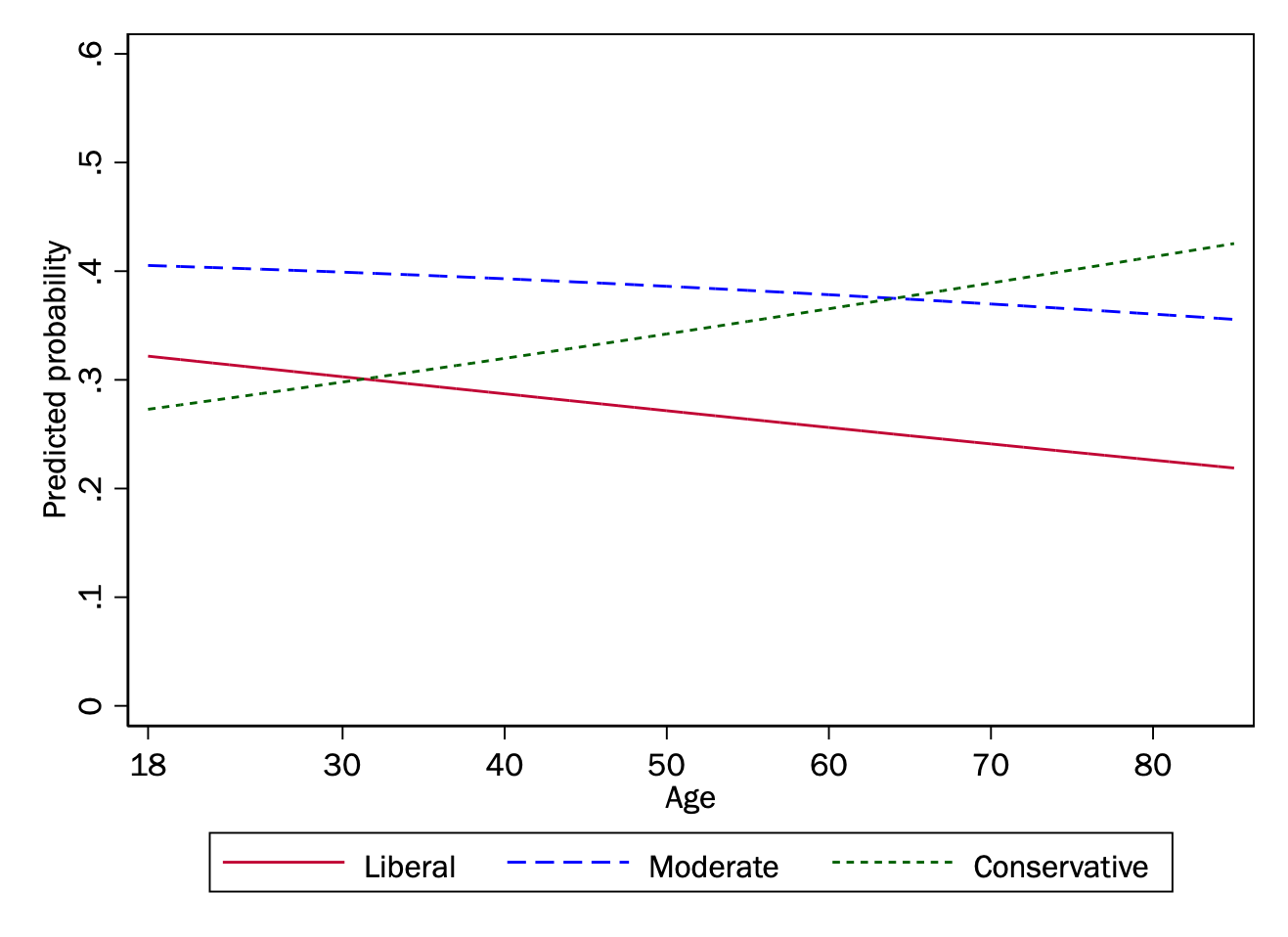
Example 1: Liberal-conservative identification by age

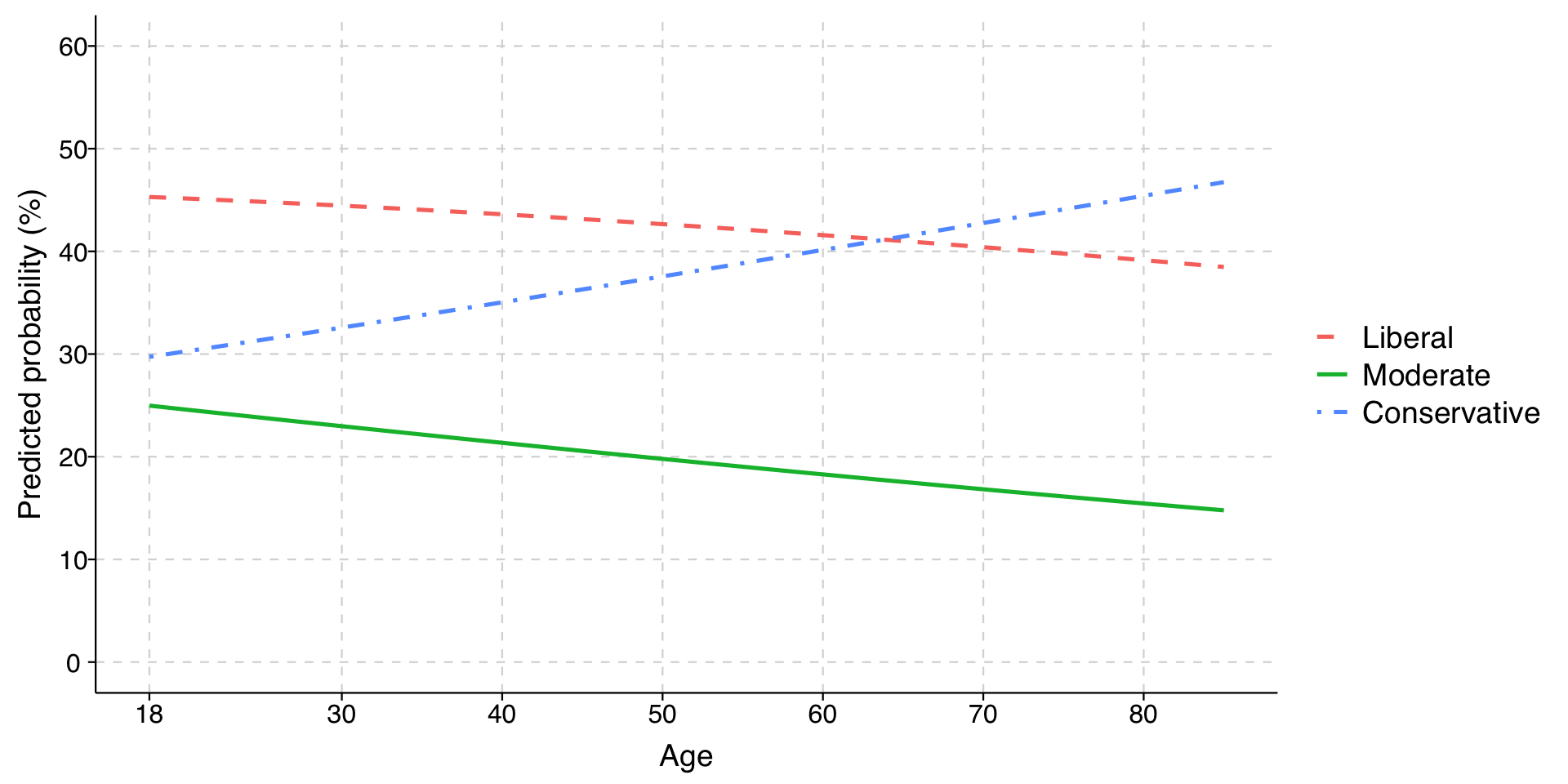
We can model the relationship implied by the coefficients of our model of liberal-conservative identification by age.

Expand to show dependencies and data recoding
library(tidyverse)
library(tulaverse)
library(marginaleffects)
library(haven)
library(texreg)
library(modelsummary)
library(nnet)

data <- read_dta("../dta/gss_soc383.dta") %>%
  filter(year >= 2000) %>%
  mutate(ed3cat = factor(ed3cat,
                  levels = c(1, 2, 3),
                  labels = c("HS or less", "Some college", "College grad"))) %>%
  mutate(race4cat = factor(race4cat, 
                        levels = c(1, 2, 3, 4),
                        labels = c("White", "Black", "Hispanic", "Other"))) %>%
  mutate(race4cat = relevel(race4cat, ref = "White")) %>%
  mutate(libcon3cat = factor(libcon3cat, 
                        levels = c(1, 2, 3),
                        labels = c("liberal", "moderate", "conservative"))) %>%
  mutate(libcon3cat = relevel(libcon3cat, ref = "moderate")) # select base category
model <- multinom(libcon3cat ~ ed3cat + race4cat + age, data = data, weights = wtssall, trace = FALSE)
Expand to show code for generating predictions and drawing plot
predictions <- predictions(
  model,
  newdata = datagrid(age = 18:85),
  type = "probs"
)

plot_data <- predictions %>%
  dplyr::select(age, group, estimate) %>%
  rename(category = group, probability = estimate)

ggplot(plot_data, aes(x = age, y = probability*100, color = category, linetype = category)) +
  geom_line(linewidth = .9) +
  scale_linetype_manual(values = c("liberal" = "solid", 
                                  "moderate" = "dashed", 
                                  "conservative" = "dotdash"),
                       labels = c("Liberal", "Moderate", "Conservative")) +
  scale_color_discrete(labels = c("Liberal", "Moderate", "Conservative")) +
  labs(
    y = "Predicted probability (%)",
    x = "Age",
    color = "",
    linetype = ""
  ) +
  scale_y_continuous(limits = c(0, 60), breaks = seq(0, 60, 10)) +
  scale_x_continuous(breaks = c(18, 30, 40, 50, 60, 70, 80)) +
  theme_tula() +
  theme(
    legend.text = element_text(size = 14),
    legend.title = element_text(size = 14),
    legend.position = "right",
    legend.direction = "vertical",
    axis.title.y = element_text(size = 14),
    axis.text.y = element_text(size = 12),
    axis.title.x = element_text(size = 14),
    axis.text.x = element_text(size = 12)
  )

In this example, you can see that the results are all fairly linear, which is not surprising because the probabilities do not change that much and stay relatively close to the middle of possible values (between .2 and .8).

Example 2: Punting by yard line

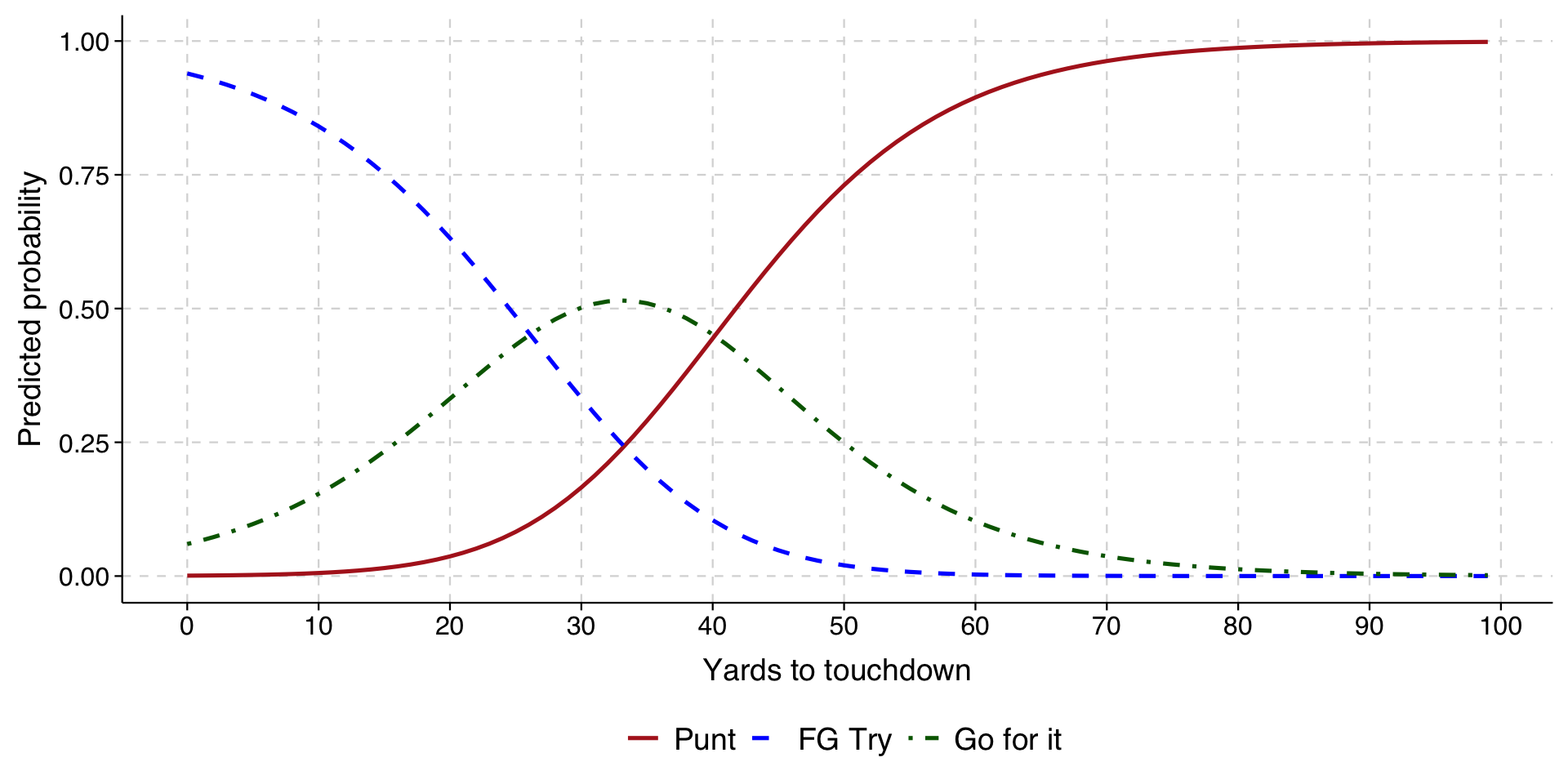
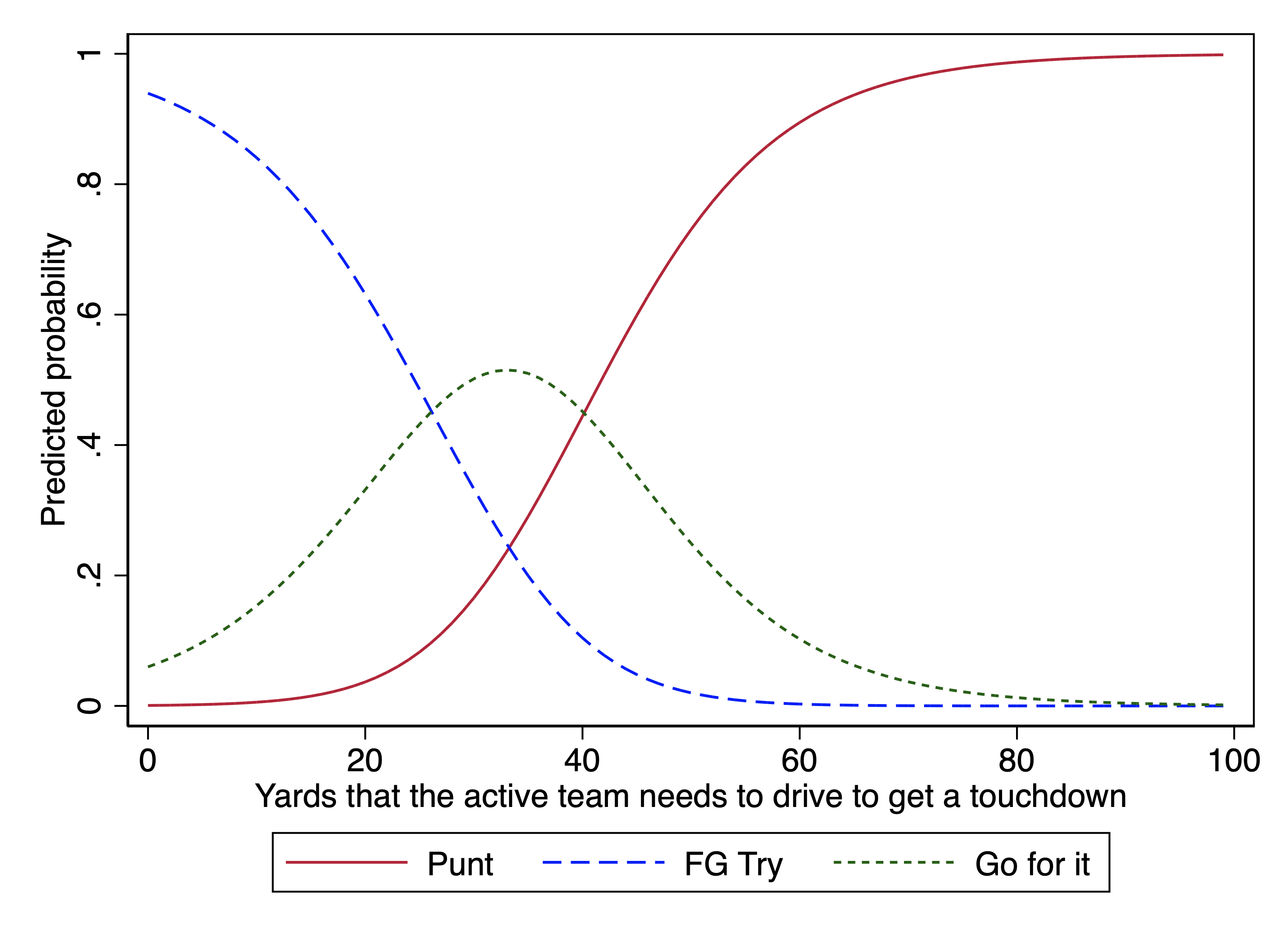
With the data on fourth-down decisions in college football, we can plot the decision by yard-line.

Expand to show data recoding
# Import Stata dataset
data <- read_dta("../dta/cfb_fourthdown.dta") %>%
  mutate(choice = factor(choice,
                  levels = c(1, 2, 3),
                  labels = c("Punt", "FG Try", "Go for it")))
# Fit the multinomial logit model
model <- multinom(choice ~ yds_to_td, data = data, trace = FALSE)
Expand to show code to draw plot
# Generate predictions at different values of yds_to_td
predictions <- predictions(
  model,
  newdata = datagrid(yds_to_td = 99:0),
  type = "probs"
)

# Create a more usable dataframe for plotting
plot_data <- predictions %>%
  dplyr::select(yds_to_td, group, estimate) %>%
  rename(choice = group, probability = estimate)

# Create plot similar to marginsplot in Stata
ggplot(plot_data, aes(x = yds_to_td, y = probability, color = choice, linetype = choice)) +
  geom_line(linewidth = .9) +
  scale_color_manual(values = c("Punt" = "firebrick", 
                               "FG Try" = "blue", 
                               "Go for it" = "darkgreen"),
                    labels = c("Punt", "FG Try", "Go for it")) +
  scale_linetype_manual(values = c("Punt" = "solid", 
                                  "FG Try" = "dashed", 
                                  "Go for it" = "dotdash"),
                       labels = c("Punt", "FG Try", "Go for it")) +
  scale_x_continuous(breaks = seq(0,100,10)) +
  labs(
    y = "Predicted probability",
    x = "Yards to touchdown",
    color = "",
    linetype = ""
  ) +
  theme_tula() +
  theme(
    legend.text = element_text(size = 14),
    legend.position = "bottom",
    legend.direction = "horizontal"
  ) +
  guides(color = guide_legend(nrow = 1))

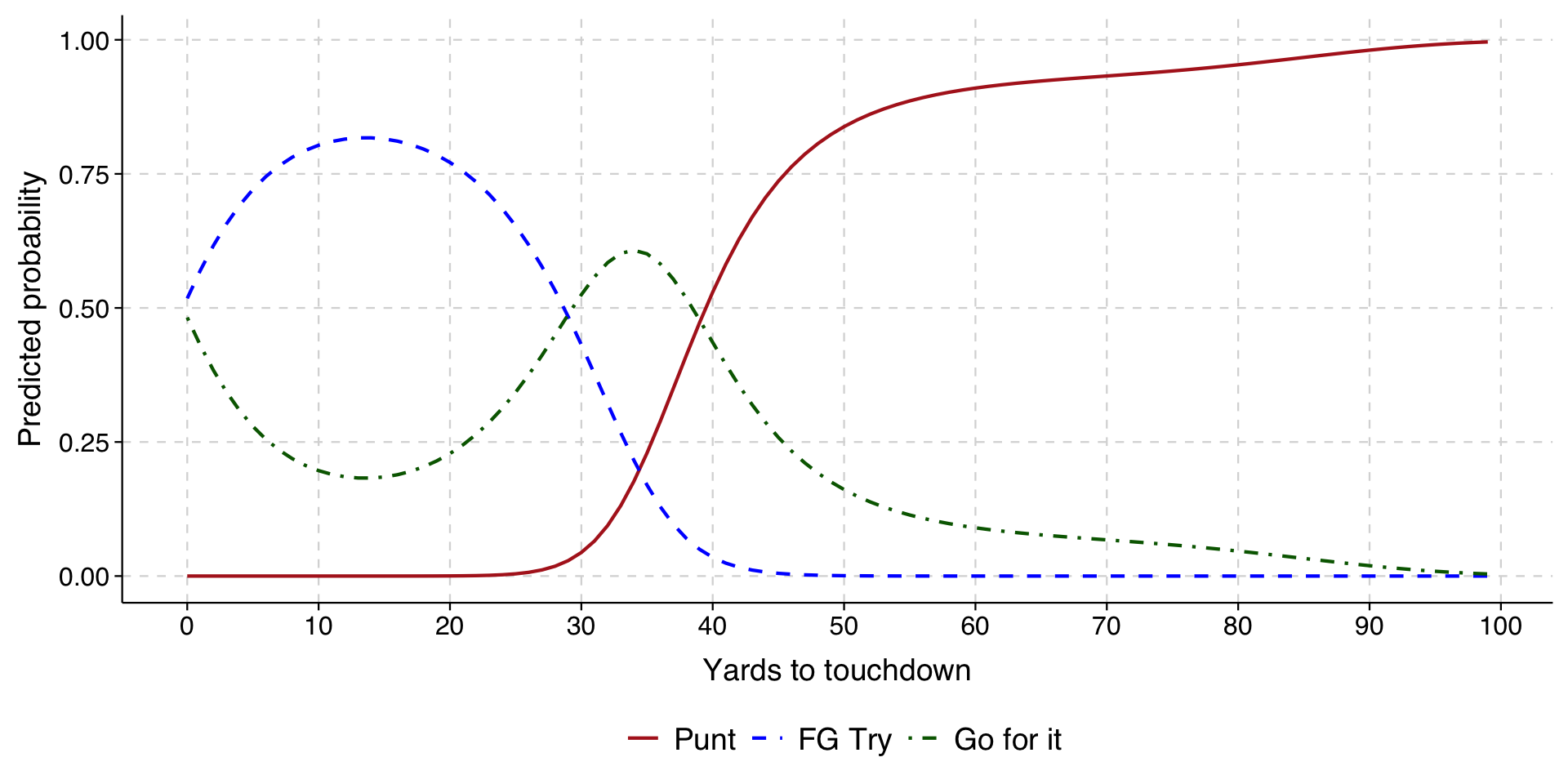
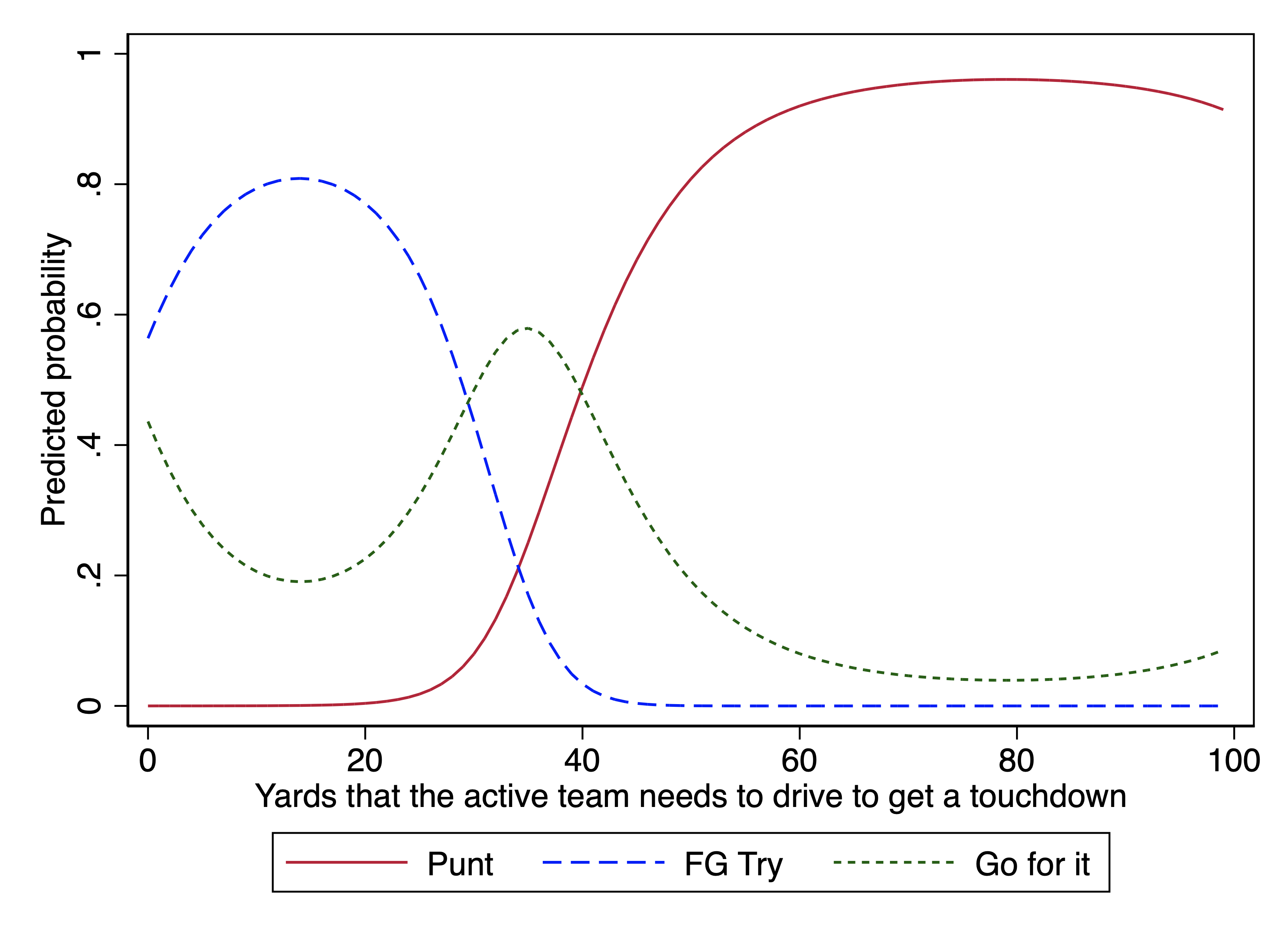
Anyone familiar with football will recognize some real shortcomings of this model. We can improve it by adding non-linear terms to the model.

Here we will include a square and cube term in our multinomial logit:

# multinomial logit with a square and cube term
model <- multinom(choice ~ yds_to_td + I(yds_to_td^2)+ I(yds_to_td^3), data = data, trace = FALSE)
Expand to show code to draw plot
# Generate predictions at different values of yds_to_td
predictions <- predictions(
  model,
  newdata = datagrid(yds_to_td = 99:0),
  type = "probs"
)

# Create a more usable dataframe for plotting
plot_data <- predictions %>%
  dplyr::select(yds_to_td, group, estimate) %>%
  rename(choice = group, probability = estimate)

# Create plot similar to marginsplot in Stata
ggplot(plot_data, aes(x = yds_to_td, y = probability, color = choice, linetype = choice)) +
  geom_line(linewidth = .75) +
  scale_color_manual(values = c("Punt" = "firebrick", 
                               "FG Try" = "blue", 
                               "Go for it" = "darkgreen"),
                    labels = c("Punt", "FG Try", "Go for it")) +
  scale_linetype_manual(values = c("Punt" = "solid", 
                                  "FG Try" = "dashed", 
                                  "Go for it" = "dotdash"),
                       labels = c("Punt", "FG Try", "Go for it")) +
    scale_x_continuous(breaks = seq(0,100,10)) +
  labs(
    y = "Predicted probability",
    x = "Yards to touchdown",
    color = "",
    linetype = ""
  ) +
  theme_tula() +
  theme(
    legend.text = element_text(size = 14),
    legend.position = "bottom",
    legend.direction = "horizontal"
  ) +
  guides(color = guide_legend(nrow = 1))

We can improve it a fair bit by including quadratic and cubic terms for yard-line.

Example 3: Childrearing values by cohort

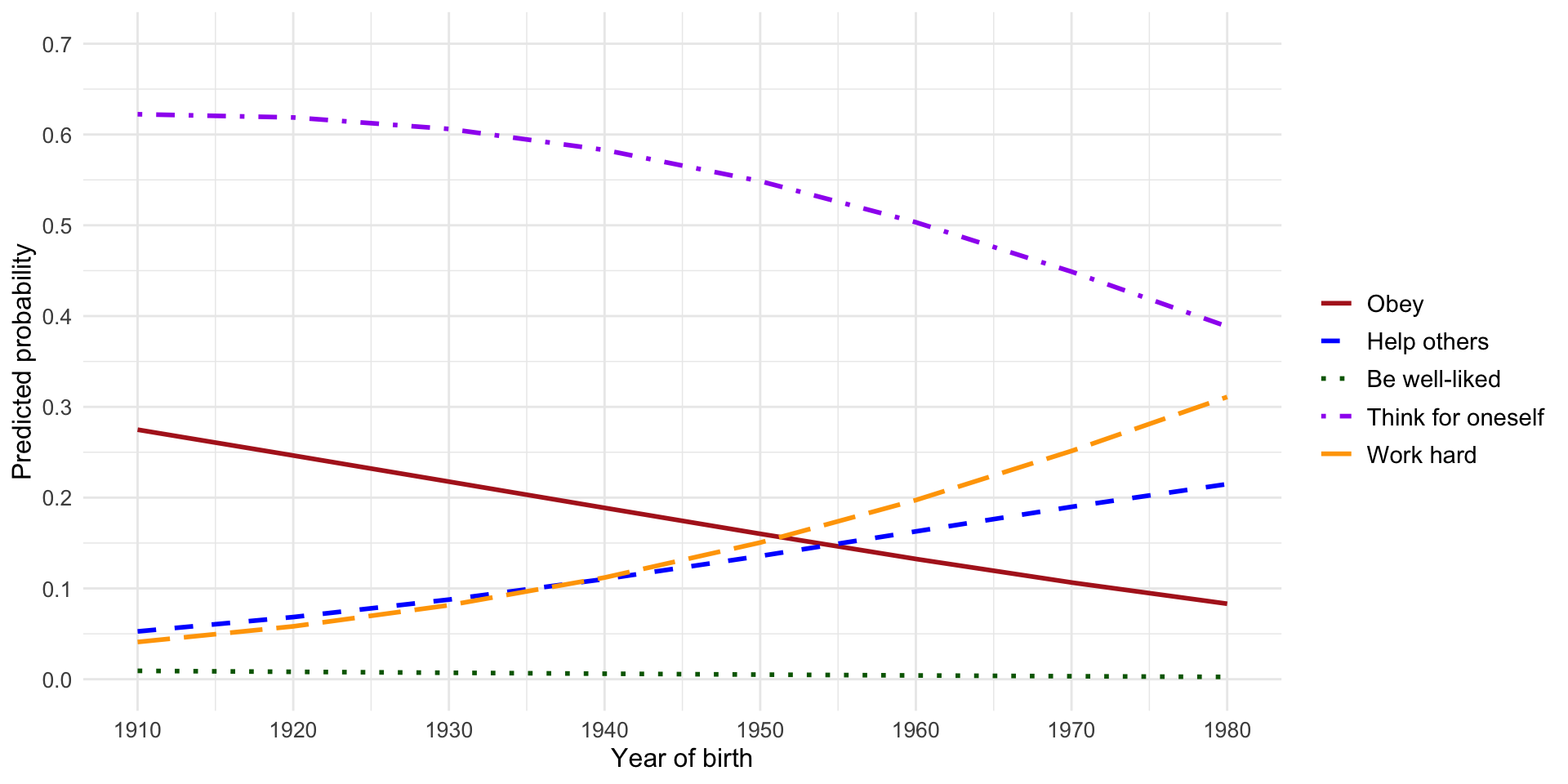
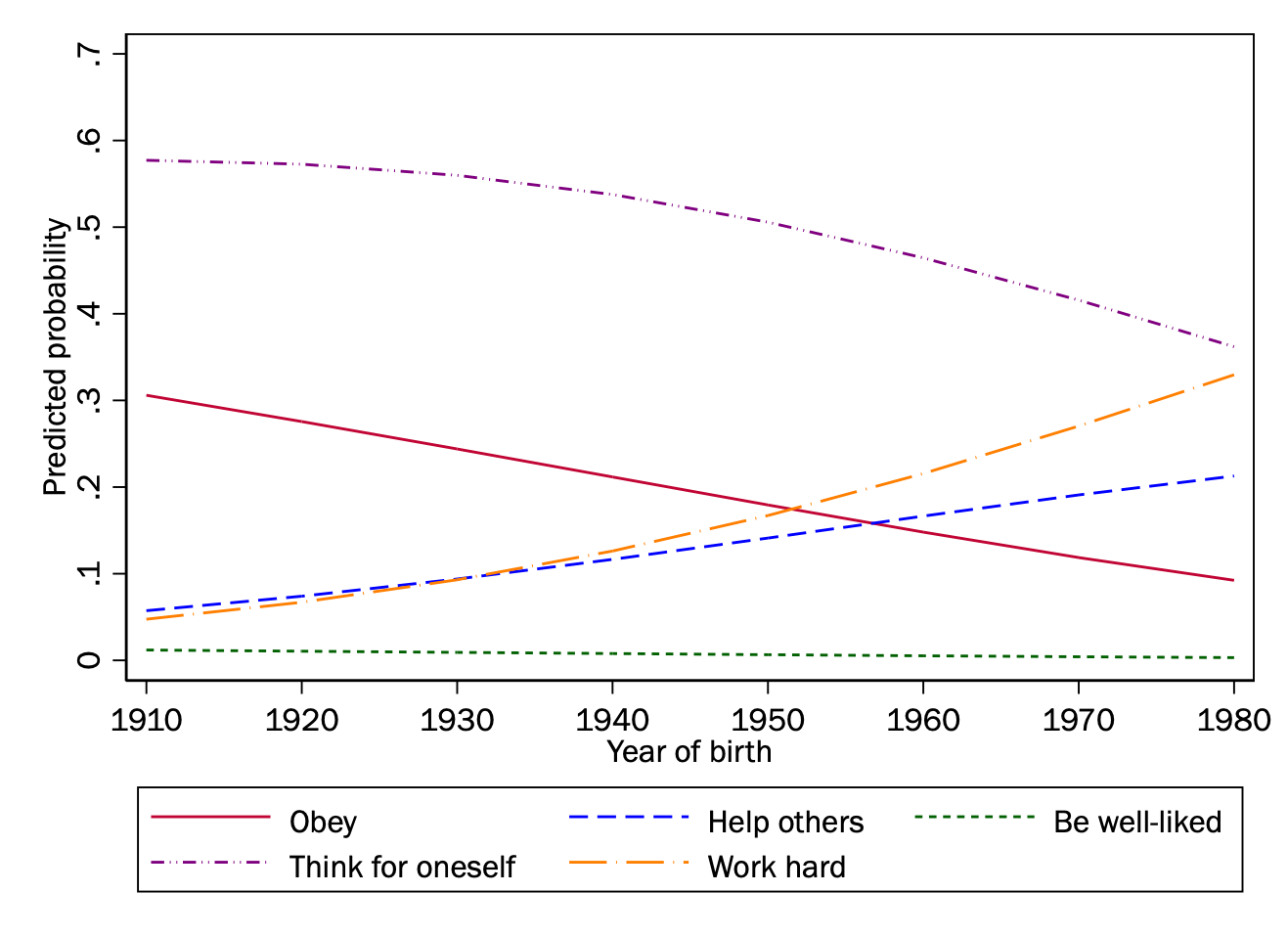
For our example of childrearing values, we will plot change by year of birth.

Expand to show open data and fit model
# Import Stata dataset
data <- read_dta("../dta/gss_soc383.dta")

# Convert categorical variables to factors
data <- data %>%
  mutate(
    male = factor(male),
    degree = factor(degree),
    race4cat = factor(race4cat),
    mostimp = factor(mostimp)
  )

# Fit multinomial logistic regression model
model <- multinom(mostimp ~ male + degree + race4cat + cohort1900 + age, 
                 data = data, 
                 trace = FALSE)
Expand to show code to generate predictions and draw plot
# Generate predictions at specified values of cohort1900
predictions <- predictions(
  model,
  newdata = datagrid(cohort1900 = seq(10, 80, 10)),
  type = "probs"
)

# Create plot data
plot_data <- predictions %>%
  dplyr::select(cohort1900, group, estimate) %>%
  rename(category = group, probability = estimate)

# Define colors and line patterns that match Stata graph
colors <- c(
  "1" = "firebrick",    
  "2" = "blue",         
  "3" = "darkgreen",    
  "4" = "purple",       
  "5" = "orange")        

# Create x-axis labels that combine cohort values with years
x_labels <- c("1910", "1920", "1930", "1940", "1950", "1960", "1970", "1980")
names(x_labels) <- c(10, 20, 30, 40, 50, 60, 70, 80)

# Create plot
ggplot(plot_data, aes(x = cohort1900, y = probability, color = category, linetype = category)) +
  geom_line(size = 1) +
  scale_color_manual(
    values = colors,
    labels = c("Obey", "Help others", "Be well-liked", "Think for oneself", "Work hard"),
    name = ""
  ) +
  scale_linetype_manual(
    values = c("solid", "dashed", "dotted", "dotdash", "longdash"),
    labels = c("Obey", "Help others", "Be well-liked", "Think for oneself", "Work hard"),
    name = ""
  ) +
  scale_x_continuous(
    breaks = seq(10, 80, 10),
    labels = x_labels,
    name = "Year of birth"
  ) +
  scale_y_continuous(
    limits = c(0, 0.7),
    breaks = seq(0, 0.7, 0.1),
    name = "Predicted probability"
  ) +
  theme_minimal() +
  theme(
    legend.position = "right",
    legend.direction = "vertical",
    legend.text = element_text(size = 11),
    axis.title = element_text(size = 12),
    axis.text = element_text(size = 10)
  ) +
  guides(
    color = guide_legend(nrow = 5, byrow = TRUE),
    linetype = guide_legend(nrow = 5, byrow = TRUE)
  )
Warning: Using `size` aesthetic for lines was deprecated in ggplot2 3.4.0.
ℹ Please use `linewidth` instead.

Example 4: Childrearing values by cohort for different levels of education

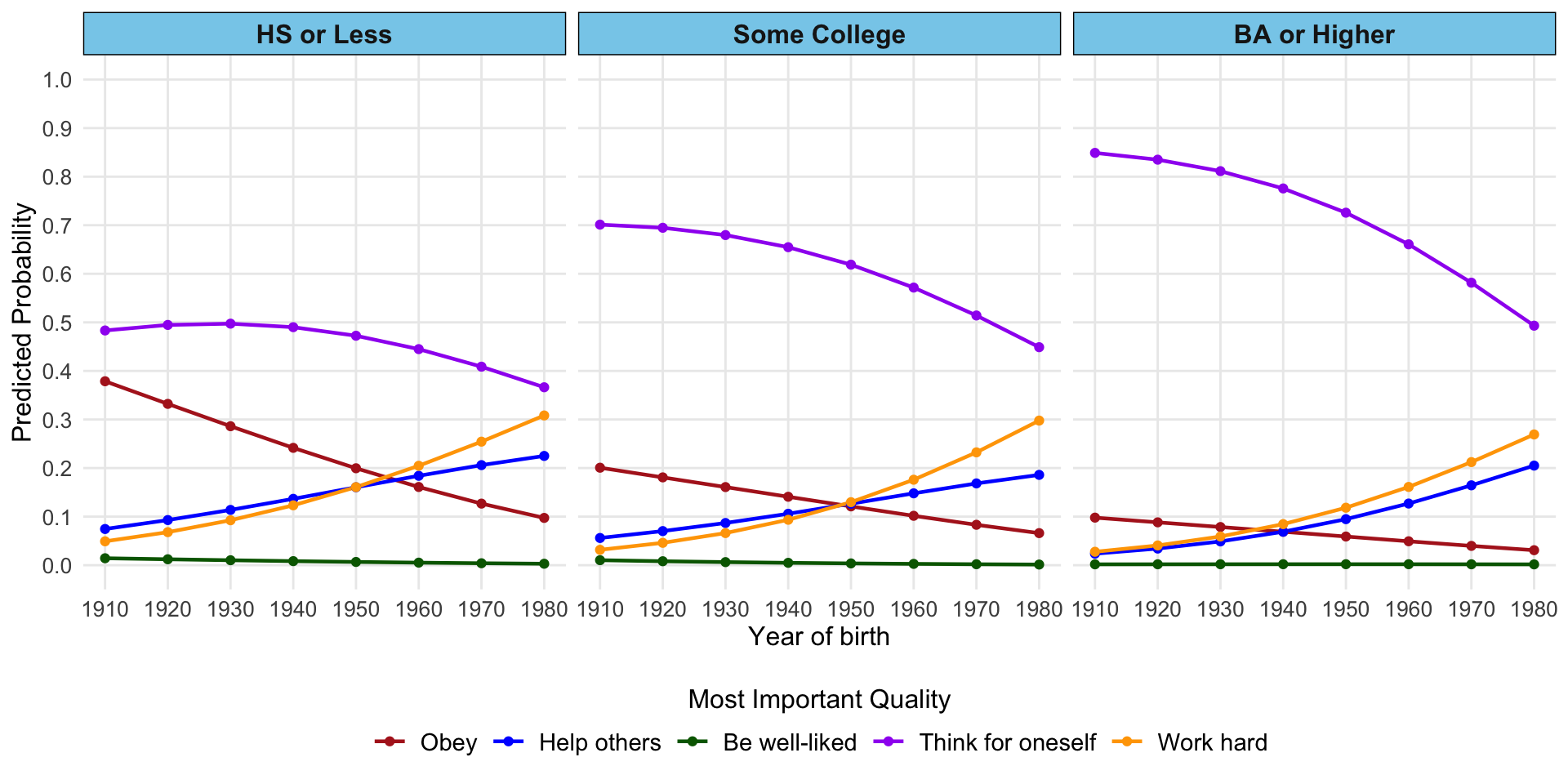
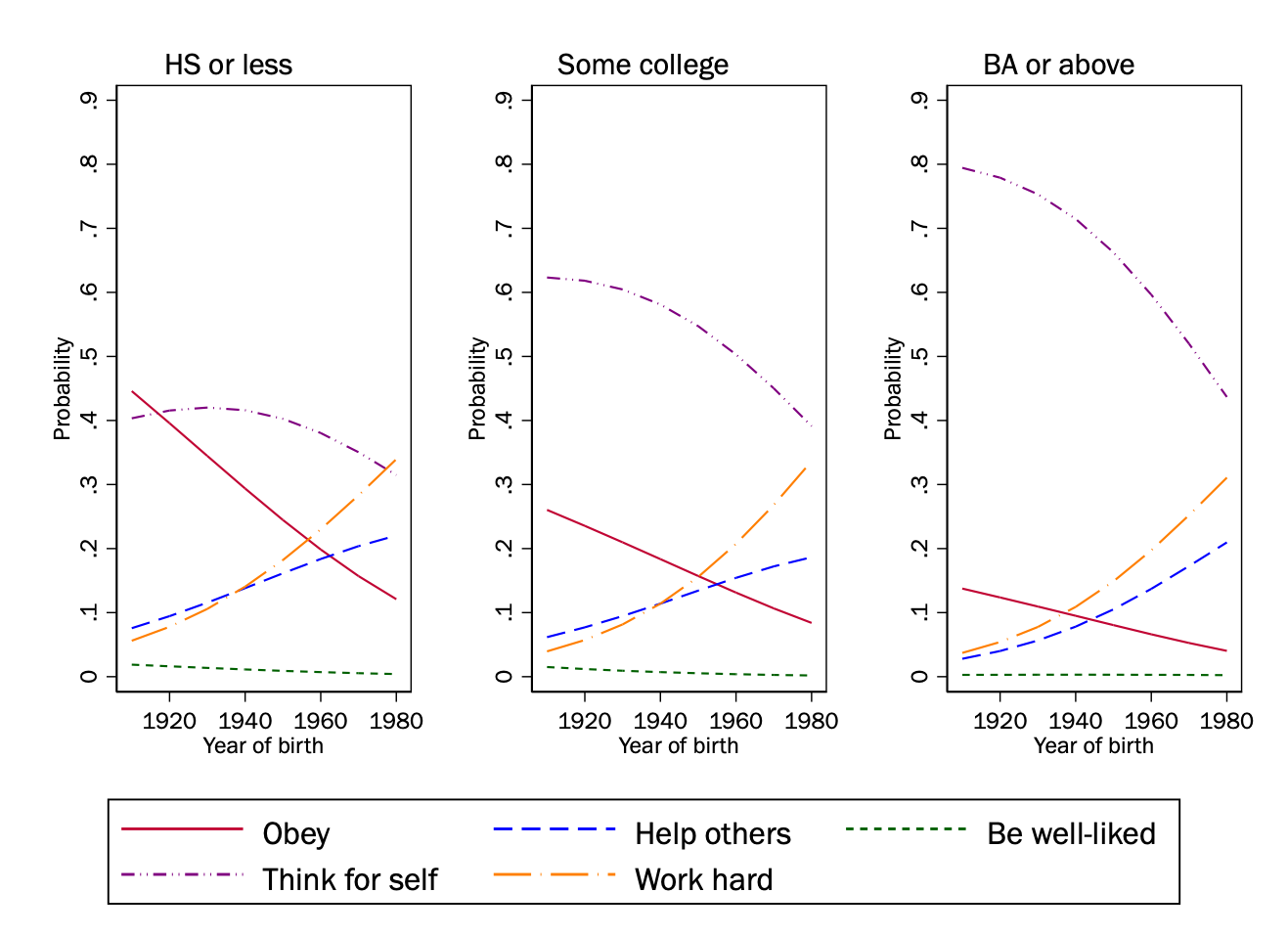
We may want to plot the interaction between a continuous and categorical variable. A plot with lines for each combination of outcome and categorical variable would get confusing quickly, so one approach is to have a separate plot for each level of the categorical variable:

model <- multinom(mostimp ~ cohort1900*as_factor(ed3cat) + male + race4cat + age, 
                 data = data, 
                 trace = FALSE)
Expand to show code to generate predictions
predictions_grid <- predictions(
  model,
  newdata = datagrid(
    cohort1900 = seq(10, 80, 10),
    ed3cat = levels(as_factor(data$ed3cat))
  ),
  type = "probs"
)

pred_df <- predictions_grid %>%
  dplyr::select(cohort1900, ed3cat, group, estimate) %>%
  rename(
    outcome_category = group,
    predicted_probability = estimate
  )

pred_df <- pred_df %>%
  arrange(cohort1900, ed3cat, outcome_category)

# relabel categories
pred_df <- pred_df %>%
  mutate(
    outcome_category = factor(
      outcome_category,
      levels = c("1", "2", "3", "4", "5"),  # Your original values
      labels = c("Obey", "Help others", "Be well-liked", "Think for oneself", "Work hard")
    ),
    ed3cat = factor(
      ed3cat,
      levels = c("hs or less", "some col", "ba or above"),  # Current values from your plot
      labels = c("HS or Less", "Some College", "BA or Higher")  # New, better-looking labels
    )
  ) 

pred_df
Expand to show code that draws plot
# Create the plot with fixes
ggplot(pred_df, aes(x = cohort1900, y = predicted_probability, 
                   color = outcome_category, group = interaction(outcome_category, ed3cat))) +
  geom_line(linewidth = .8) +
  geom_point(size = 1.5) +
  facet_wrap(~ ed3cat, ncol = 3) +
  scale_color_manual(
    values = c("Obey" = "firebrick", 
               "Help others" = "blue", 
               "Be well-liked" = "darkgreen",
               "Think for oneself" = "purple", 
               "Work hard" = "orange"),
    name = "Most Important Quality"
  ) +
  scale_x_continuous(
    breaks = seq(10, 80, 10),
    labels = paste0(seq(10, 80, 10) + 1900),
    name = "Year of birth"
  ) +
  scale_y_continuous(
    limits = c(0, 1),
    breaks = seq(0, 1, 0.1),
    name = "Predicted Probability"
  ) +
  theme_minimal() +
  theme(
    legend.position = "bottom",
    legend.title = element_text(size = 12),
    legend.text = element_text(size = 11),
    strip.background = element_rect(fill = "skyblue"),
    strip.text = element_text(size = 12, face = "bold"),
    axis.title = element_text(size = 12),
    axis.text = element_text(size = 10),
    panel.grid.minor = element_blank()
  ) +
  guides(color = guide_legend(nrow = 1, title.position = "top", title.hjust = 0.5))